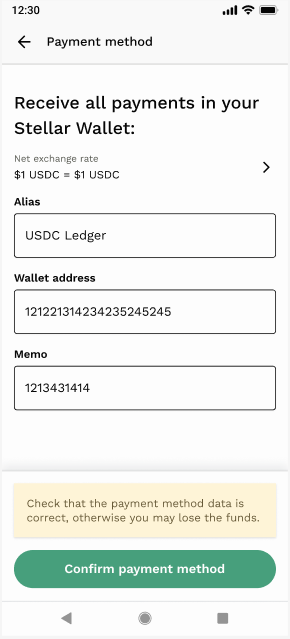
Follow the instructions in the images below to activate your new payout method. Remember you need to withdraw all funds from your existing Airtm account before you can start using the new experience.
1. Login to Airtm and select Stablecoin as your payout method.
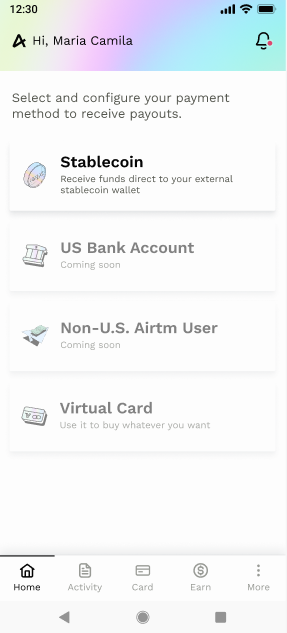
2. Choose USDC as your currency.
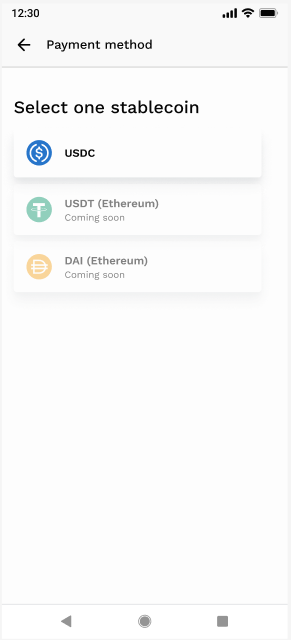
3. Select Stellar as the blockchain network.
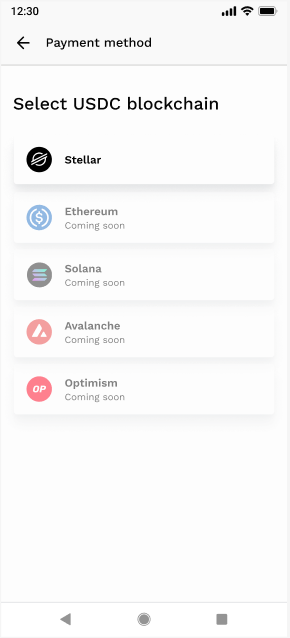
4. Enter your Stellar wallet address and a memo if required.
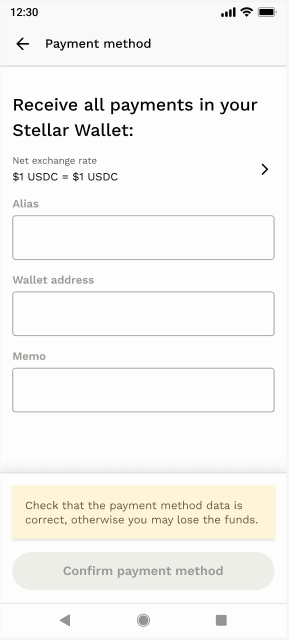
5. Confirm the setup and ensure all details are correct.
Important: Remember you will be required to have your payment method pre-configured in order to receive a payout from an enterprise. Until then — should you receive a payout — your payout will remain in a "Pending" state and be completed once you have successfully configured your payment method. You will no longer be able to hold funds in Airtm for any length of time — only receive and withdraw instantly.
¿Le fue útil este artículo?
¡Qué bueno!
Gracias por sus comentarios
¡Sentimos mucho no haber sido de ayuda!
Gracias por sus comentarios
Comentarios enviados
Agradecemos su iniciativa, e intentaremos corregir el artículo
¡Gracias por tu feedback!